1
Install in Chrome
One click from the Chrome Web Store. No account creation. No credit card. ~10 seconds.

Tolomail
Stop missing replies you're owed, losing threads mid-deal, or digging for a file. Tolomail turns Gmail into a memory-and-accountability workspace — awaiting-reply tracking, projects, shared team notes, a thread map, and searchable attachments — all on your device, with read-only Gmail access.
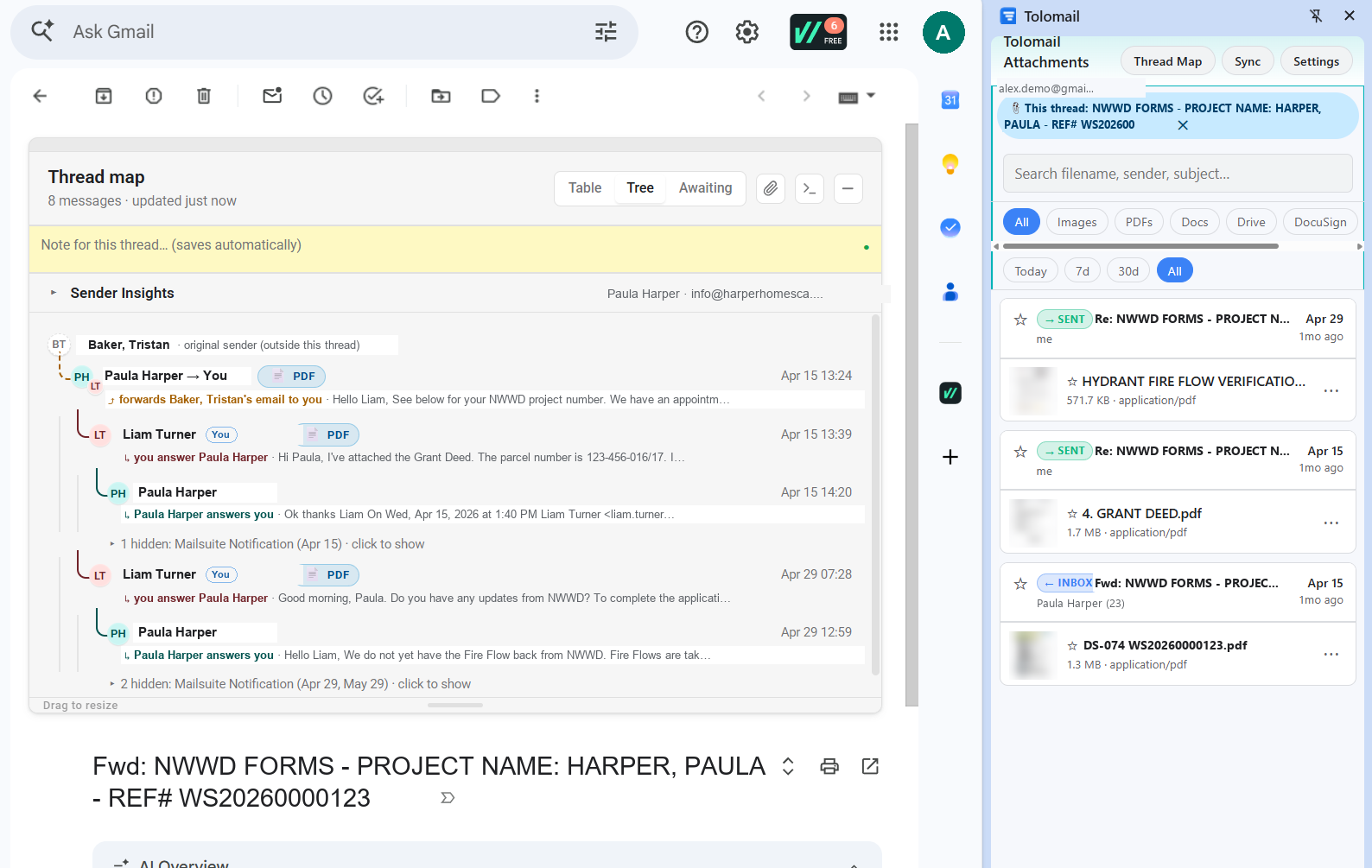
Actual Tolomail in Gmail. Sample data.
For inboxes you can't afford to lose
HOW IT WORKS
No setup, no config, no servers. Four steps, then it's just always there.
One click from the Chrome Web Store. No account creation. No credit card. ~10 seconds.
Chrome hides new extensions behind the puzzle icon. Click the puzzle, then the pin next to Tolomail — its icon stays visible, and one click opens the switches to turn Thread Map and Attachments on or off.
See the three steps below ↓
Google's standard OAuth screen. Read-only scope. Works with personal Gmail and Google Workspace (subject to your IT admin's settings). Your data never leaves your browser — there is no server to send it to.
Tolomail instantly maps it: structure, who replied last, who's been waiting, and every attachment. Always one keystroke away.
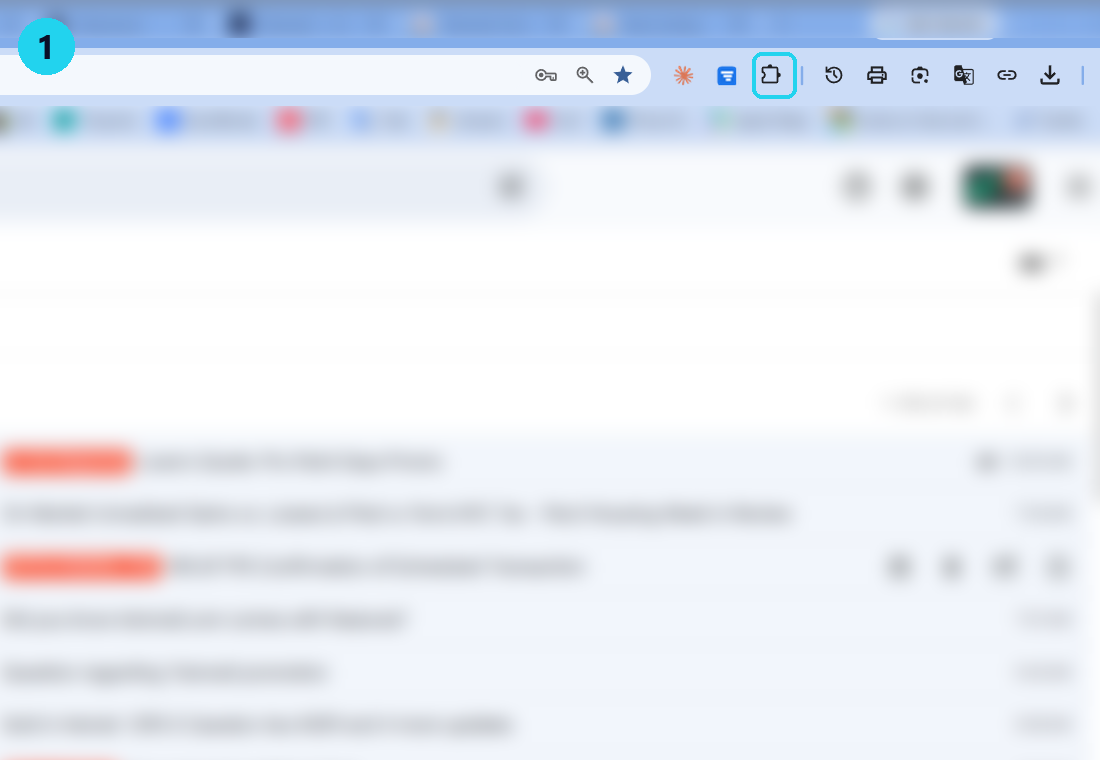
1. Click the puzzle icon in Chrome's toolbar.
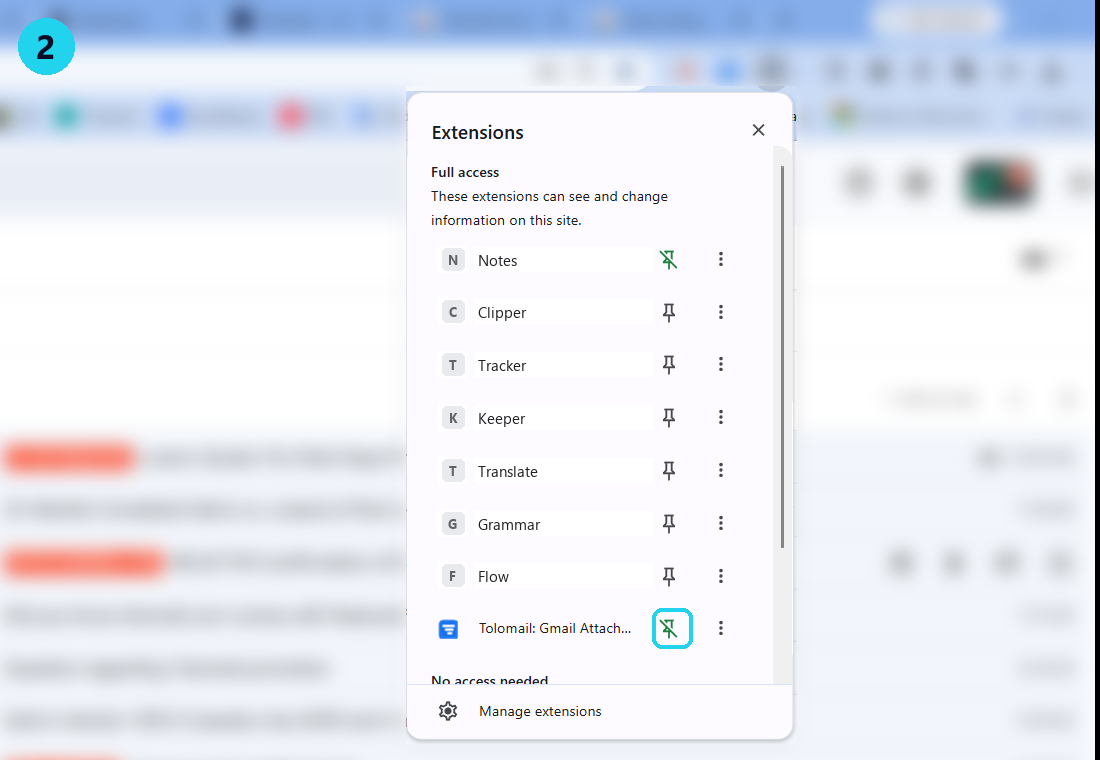
2. Click the pin next to Tolomail.
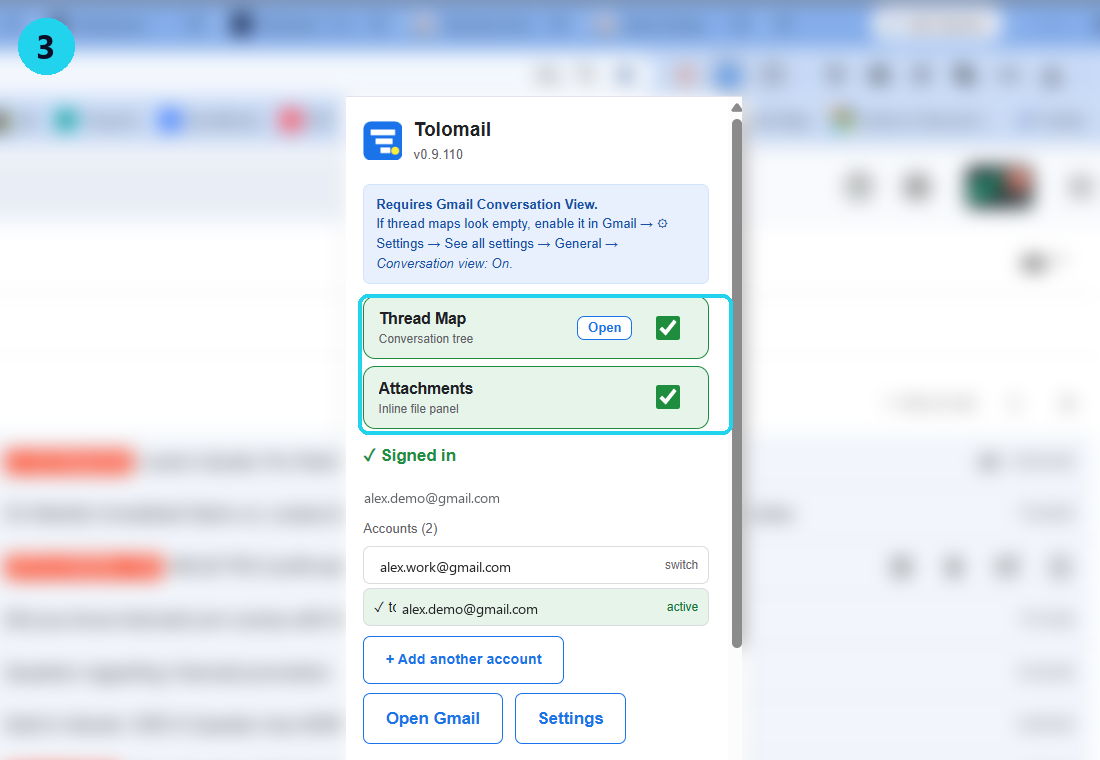
3. Click the icon — switch features on or off.
Real Chrome, real Tolomail. Sample data.
The thread fell off page one. The reply needed a nudge three days ago. The attachment is in an email from six weeks back that you can't find. Gmail's search is great for finding words — useless for the question that actually matters:
"Who am I waiting on, and how long have I been waiting?"
Tolomail answers that — and four other questions Gmail won't.
FEATURES
Everything Tolomail adds, you can see at a glance — without ever leaving Gmail.
Group the threads that matter into projects and sub-projects, add to-dos with calendar reminders, and let Tolomail pull in the right emails for you. "Find emails" runs a Gmail search from your project's keywords and files matching threads into the right place — you review every match before it's saved. Color-code projects, see all your open to-dos in one view.
For lawyers, recruiters and BD operators running many matters at once. The search is read-only and runs against Google's own Gmail API — your keywords and to-dos never leave your device.
A project with sub-projects, to-dos and auto-filed emails. Sample data.
Reply hierarchy, sender colors, depth, timing — at a glance. Click any node to scroll Gmail to that message. Works on threads with 40+ replies where Gmail's stack view becomes unreadable.
For boutique lawyers reconstructing who responded to which clause.
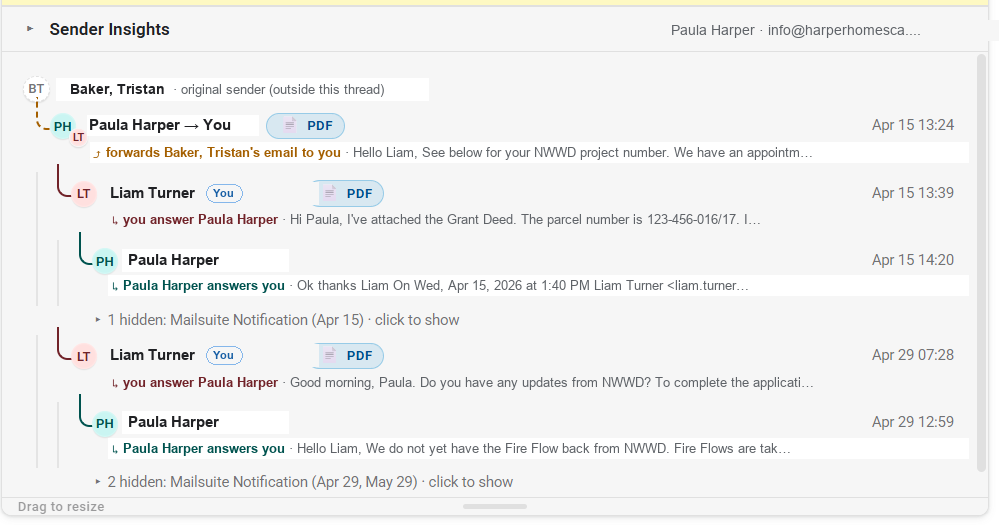
The real Thread Map — who answered whom, forwards with their origin, dates always visible. Sample data.
Tolomail scans your sent mail and flags threads where the ball is in their court. Days-pill goes amber, then red. Auto-dismisses when they reply. Add a private note to remember what's pending.
For agency recruiters tracking which candidates ghosted, and for how long.
Awaiting list with inline notes.
Open any email. Tolomail tells you how often you correspond, when they last replied, your average response time, and how many threads are still open. Built from your own Gmail history — never sent off-device. Shown in the in-Gmail card view.
For founders walking into a call: 30 seconds of context, instead of 5 minutes of scrolling.
Sender insights for the current correspondent.
A Chrome side panel with a local index of your Gmail attachments — it follows the folder you're in (Inbox or Sent). Filter by type, sender, or date. Favorite the important ones. Open any file's email in Gmail. Off by default — turn it on when you want it.
For BD operators tracking term sheets and signed PDFs across deals.
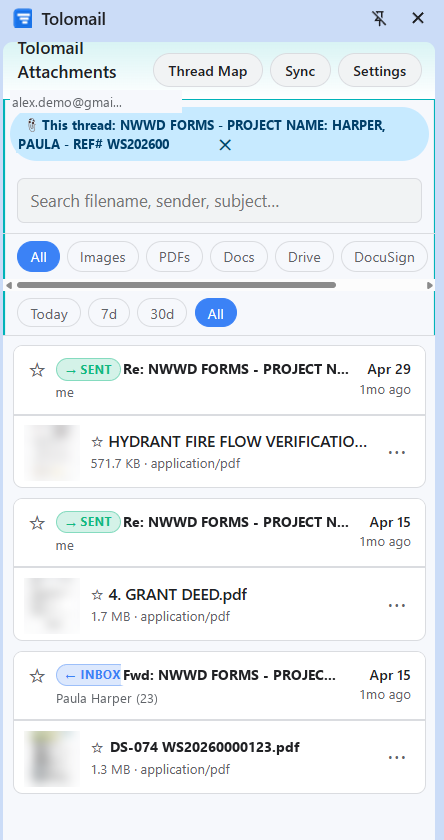
The real Attachments panel, filtered to one thread. Sample data.
Tap any file in the Attachments panel for a full in-panel preview — no download, no tab switch. Then "Open in Gmail" lands you on the conversation that carried it, in the right account.
No more digging through 30 messages to find which one had the PDF.
Preview in the panel, open in Gmail.
Each account gets a unique neon color. Switch Gmail tabs — Tolomail follows in under a second. The header, the borders, the chip in the corner all change to match. You always know which inbox you're looking at.
Work + personal Gmail open at the same time? Never mix them up again.
Two accounts, two neon identities — no mix-ups.
One yellow sticky per conversation. Visible only to you, never sent to Gmail. Optionally backed up to your own Google Drive private appdata folder (off by default; toggle on in Settings).
"Called Anna re: contract, waiting on signed copy" — right where you'll see it next time.
Pinned to the thread, never to Gmail.
Address a note or to-do "For:" a specific teammate. It shows up on their Tolomail and stays out of everyone else's way — so the whole team isn't pinged about something that's not theirs. Works when your team shares one Google account; everything stays on-device (and in your own Drive backup, if you turn it on).
For the admin routing client work: "Marco handles the lease, Anna handles escrow" — without a thread of @-mentions.
Each item shows only on the teammate it's for. Sample data.
Tolomail groups your inbox by time: a colored week divider (This week, Last week, Week of…) before each week, and a small colored day label on every message. Choose calendar weeks or a rolling 7-day view. It reads the date Gmail already shows — no network, nothing leaves your device.
Scanning for "that email from early last week" stops being a scroll-and-squint.
Weeks and days, color-coded. Sample data.
SMALL THINGS, BIG DIFFERENCE
Tolomail can never send, delete, modify, or move a single message. We literally can't.
Every feature has its own toggle in the popup. Off = it does nothing. On = back to normal.
Long conversation? Type to highlight matches across every message at once.
Click any saved note → Tolomail opens that exact Gmail thread.
"Awaiting reply" after 3 days? 7? 14? Set it in Settings (1–60). Dismiss any thread with one click — it returns when a new message arrives.
Off by default. Toggle on → notes sync to your own Drive. Nobody else can read it.
WHO IT'S FOR
Three flavors of the same problem. Tolomail solves all three the same way.
You're tracking 14 active matters. Every one of them is a Gmail thread that has to never go cold. Tolomail's Awaiting list tells you which client is overdue for a follow-up, and the thread map lets you reconstruct who agreed to what — in seconds.
You're juggling 40 candidates across 8 roles. Gmail collapses them into a wall of subject lines. Tolomail surfaces who's ghosted, for how long, and exactly which thread is waiting on a yes/no — so no one falls through the cracks.
Complex deals = long threads = lost context. Sender insights gives you a 30-second briefing before any call. Attachments panel finds the signed term sheet from three weeks ago. Notes remind you what you promised whom.
PRIVACY
Most "Gmail productivity" tools route your email through a server. Tolomail doesn't. There is no Tolomail server. Your data is read in your browser, stored on your device, and that's where it stays.
OUR STORY
Tolomeo is the Italian name for Ptolemy, the Alexandrian astronomer who, around 150 CE, produced the first systematic catalog of the stars — the Almagest. For 1,400 years, sailors crossed the open sea with Ptolemy's map of the heavens in mind.
Your inbox is similar: a sprawl of luminaries (people who matter), constellations (long-running threads), and a lot of unmapped dark. Tolomail puts the structure in front of you so you can navigate by it instead of guessing.
Hand-built in Italy by Lorenzo Toccaceli, an indie developer.
FAQ
Tolomail runs entirely in your browser. There is no Tolomail server. Your messages, threads, attachments and notes are read locally, stored locally (in IndexedDB and chrome.storage), and never transmitted anywhere we control. The optional Drive backup goes to your own Google Drive private appdata folder — we can't see it.
Tolomail uses the gmail.readonly scope — the most restrictive Gmail scope Google offers. It lets us read your messages and metadata to build the thread map, awaiting list, sender insights, and to find emails for your Projects. It does not let us send, modify, archive or delete anything. Ever.
When you click Find emails, Tolomail builds a Gmail search from your project's keywords and runs it against Google's own first-party Gmail API — the same API Gmail's search box uses. It is not a third party and not an AI service. Tolomail shows you the matching threads to review, then files the ones you keep into your project inside Tolomail — it never labels, moves, or modifies your actual Gmail. Your project names, keywords and to-dos stay on your device.
If your team shares one Google account, you give each install a station name and address in Settings and build a team roster. Then you can address a note or to-do "For:" a teammate, and it only shows on their Tolomail — keeping the rest of the team's view clean. It's entirely on-device (and in your own Google Drive backup if you turn that on); nothing is sent to Tolomail or any third party. The targeting is a visibility filter to cut noise, not a security boundary.
Yes — add as many as you want. Each gets a different neon border color so you always know which account you're looking at. Tolomail follows whichever Gmail tab is focused and switches automatically. Per-account data is fully isolated (separate storage, separate Drive backup).
A heuristic: it looks at threads where your last message was a "substantive" reply (a question, a request, or anything that genuinely expects a response — not just "thanks!") and flags ones where the other party hasn't responded for N days. Auto-responders, bulk mail and FYI-forwards are filtered out. You can dismiss any item with one click — it stays hidden until a new message arrives in that thread.
Chrome wipes everything — IndexedDB, chrome.storage, the lot. The optional Drive backup stays in your Drive (you own it). No leftovers, no zombie accounts on our side, because there is no "our side."
No. Tolomail only works with Gmail (including Google Workspace). We only have permission to access Gmail's API, and the UI is built to dock specifically into Gmail's interface.
No. Tolomail is a Chrome extension and uses Chrome-specific APIs (sidePanel, identity) that aren't available elsewhere. Chromium-based browsers like Edge, Brave and Arc may work via sideloading but aren't officially supported in v1. Firefox is on the long-term roadmap but has no timeline.
Yes — Tolomail works on Workspace Gmail the same way as personal @gmail.com accounts. However, your Workspace admin may have restricted third-party access to Gmail or disabled extension installation. If so, you won't be able to install. Check with your IT team if in doubt.
Not yet. Tolomail is desktop-only — Chrome extensions don't run on mobile. Mobile support is on the roadmap but isn't committed.
Tolomail relies on Gmail's Conversation View (it's on by default in Gmail). If you've turned it off, every email is treated as a single message and there's no thread to map. Enable it in Gmail → ⚙ Settings → See all settings → General → Conversation view: On.
Press Alt+Shift+L in Gmail to open Tolomail's built-in diagnostics panel, click Copy all, and paste it into an email to [email protected]. The diagnostics are privacy-masked by design: email addresses are masked, search queries and label names are redacted, and message subjects and bodies are never logged — you can read every line before you send it. Details in our privacy policy.
Tolomail is free during the beta — install it today from the Chrome Web Store. Pro launches at $5.99/month ($49/year — about a latte a month, billed once). Beta testers keep Pro free forever — install now to grandfather in.
PRICING
Beta testers keep Pro free forever. Everyone else gets a genuine free tier and a fair Pro upgrade.
$0/month
For anyone who wants a better Gmail.
$5.99/month
For people who can't afford to miss a reply.
$49/yr if billed annually after launch — less than ten coffees. Beta testers: free forever.
Team plans coming after launch. Reach out at [email protected] if you'd like early notice.
Tolomail is live on the Chrome Web Store. One-click install — free during beta.
Requires Chrome + Gmail (or Google Workspace), with Gmail's Conversation View turned on (it's Gmail's default).